Looking for the best free games for a low-end PC? Start with RAM and graphics hardware, not genre. This shortlist compares published minimums and clearly labels reported requirements. It does not promise a specific FPS or preset.
Quick answer: which game fits your rig?
| Game | Published or reported RAM | Graphics floor | Storage | Best fit | Main catch |
|---|---|---|---|---|---|
| Project Entropy | 4 GB minimum | GTX 460 / Radeon HD 4400 | 8 GB | Older Windows PC | Mixed reviews; no recommended spec |
| Star Trek Fleet Command | 8 GB PC minimum | Intel HD Graphics 4400 | Not listed | 8 GB laptop or modest PC | Scopely warns minimums may not be enough |
| Sea of Conquest | 4 GB reported; 8 GB recommended | Not specified | 10 GB reported | Older PC for casual strategy | Detailed publisher spec sheet not found |
| RAID: Shadow Legends | 8 GB minimum and recommended | DirectX 11 / Vulkan-capable GPU | 5 GB | 8 GB Windows PC | Gacha and grind pressure |
| Zenless Zone Zero | 8 GB minimum | GTX 970 minimum | 57 GB + unzip headroom | Older dedicated-GPU desktop | Not a safe integrated-graphics pick |
Fastest shortlist: Project Entropy is the clearest 4 GB candidate. Star Trek Fleet Command is the interesting 8 GB option, but its own support page warns that minimums may not be enough for an enjoyable experience. ZZZ is the reminder that “free” does not mean “light.”
What counts as a low-end gaming PC in 2026?
“Low-end” is a hardware situation, not a fixed age label.
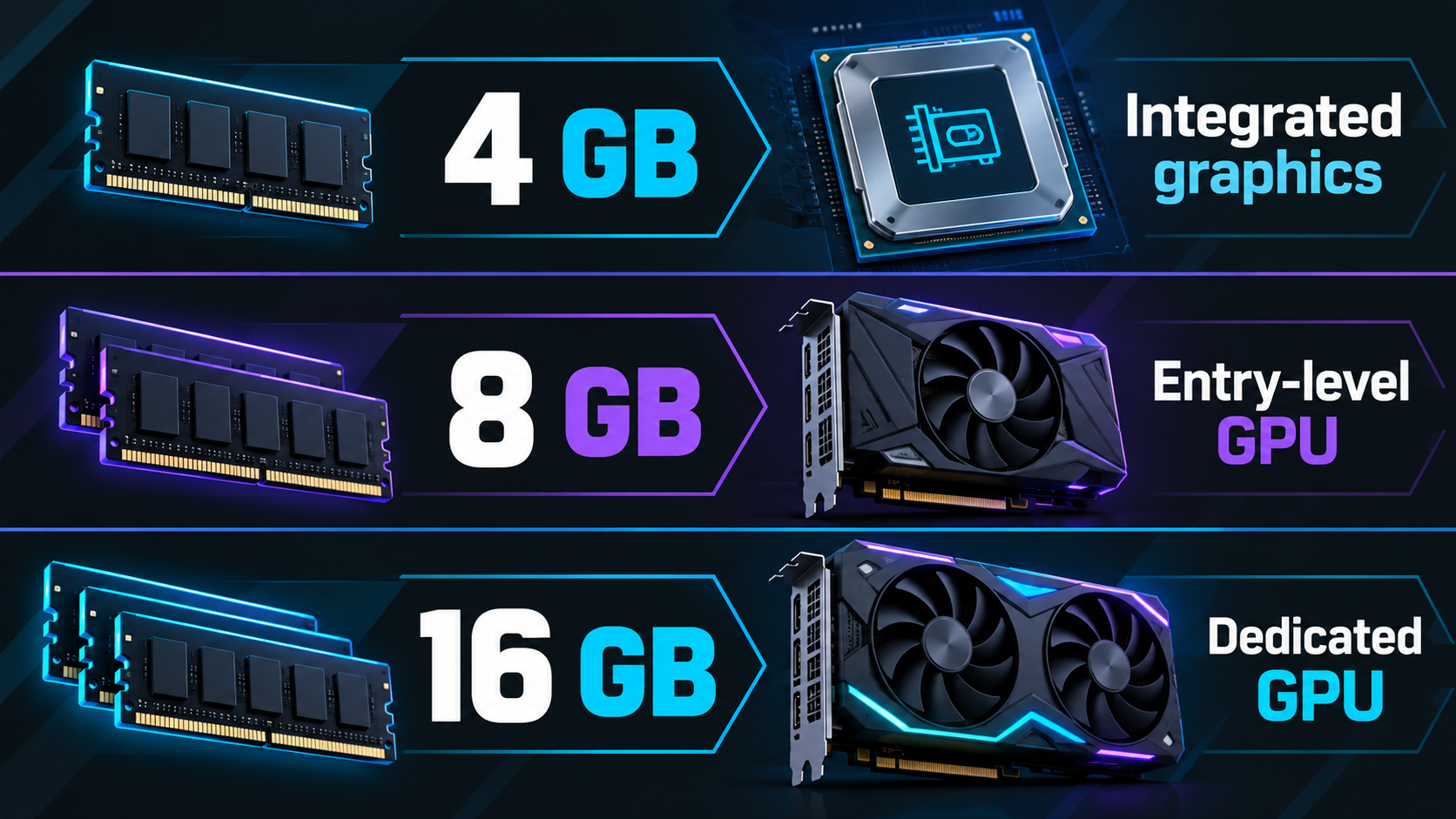
- 4 GB RAM with integrated graphics: the tightest tier. Focus on lighter games and close background apps.
- 8 GB RAM with entry-level or older dedicated graphics: a more realistic baseline for many free-to-play PC games.
- 16 GB RAM with an older dedicated GPU: more breathing room for current clients, patches and multitasking. It still does not make a modern open-world game low-end.
The Steam Hardware & Software Survey for September 2026 shows 16 GB and 32 GB systems dominating its reported sample. That makes 8 GB a useful budget filter, not a guarantee. Check your machine with our Can Your PC Run It? specs guide.
Best picks by hardware tier
Project Entropy — best first check for a 4 GB PC
Best for: sci-fi strategy, alliance play and players who prefer menus to twitch combat.
Published floor: the official Steam listing gives Windows 7 SP1 64-bit, an Intel Core 2 Duo 2.2 GHz, 4 GB RAM, a GTX 460 or Radeon HD 4400-class GPU and 8 GB of storage. It publishes no recommended specs.
Why it may fit: those numbers are light compared with current 3D open-world games. The loop is strategy, fleets and alliances rather than constant high-speed rendering.
Watch out for: the Steam client itself now requires Windows 10 or later. Steam reviews were Mixed when checked, so low hardware demand is not a quality guarantee. The game also includes online PvP and in-app purchases.
Evidence status: official Steam minimums; no HudPicks hands-on performance test.
Star Trek Fleet Command — best for an 8 GB strategy laptop
Best for: Star Trek fans who like base building, officer rosters and alliance wars.
Published floor: Scopely lists Windows 10 64-bit, an Intel i3-4130 at 3.4 GHz, 8 GB RAM and Intel HD Graphics 4400 for PC. It does not publish recommended PC specs.
Why it may fit: the integrated Intel target makes it a more plausible older-laptop candidate than a modern action RPG. The loop is map decisions, queues and fleet management.
Watch out for: Scopely explicitly says the minimum specs alone may not be enough to enjoy the game. Leave room for updates and patches; alliance PvP also makes progression pressure noticeable.
Evidence status: official Scopely minimums; no HudPicks hands-on performance test.
Sea of Conquest: Pirate War — a cautious 4 GB option
Best for: casual pirate strategy, ship upgrades and guild-style progression.
Published floor: the available PC requirement report lists Windows 7 or above, 4 GB RAM, 10 GB free storage and no specified GPU; 8 GB RAM is reported as the recommendation.
Why it may fit: its ship-and-menu focus suggests a lighter profile than a modern open-world action game.
Watch out for: FunPlus does not provide a detailed official spec sheet in the source recorded here. Treat these numbers as reported, not guaranteed. Online connection is required. The existing HudPicks affiliate offer remains disabled.
Evidence status: secondary requirements report; recheck the publisher or launcher before publication.
RAID: Shadow Legends — light on hardware, heavy on systems
Best for: turn-based team building, auto-battle and short daily sessions.
Published floor: Steam lists Windows 10 version 21H1 or Windows 11 21H2, 8 GB RAM, a DirectX 11 or Vulkan-capable GPU and 5 GB of storage. The recommended listing also says 8 GB RAM and 8 GB storage.
Why it may fit: the official requirements do not demand a named modern gaming GPU. With 8 GB RAM and a compatible graphics API, RAID is approachable on paper.
Watch out for: the live-service loop is the bigger commitment. Energy, events, shards and upgrade materials can feel grindy if you want to compete quickly. Read our gacha guide before spending.
Evidence status: current Steam system requirements; no HudPicks hands-on performance test.
Free games that are not automatically low-end
Zenless Zone Zero
ZZZ is a useful reality check. HoYoverse lists 8 GB RAM, a 7th-generation Intel Core i5 or AMD equivalent, a GTX 970-class GPU and roughly 57 GB of storage, plus unpacking space. That is a higher bar than an old laptop with integrated graphics.
It can be a strong free action RPG if your PC clears the official floor, but it is not a sensible blind download at 4 GB RAM or on weak integrated graphics. Leave extra storage headroom and remember that a minimum spec is not a frame-rate promise.
The same warning applies to newer open-world titles. NTE lists 16 GB RAM minimum and 70 GB storage in the current HudPicks record. Arknights: Endfield lists 16 GB RAM, a GTX 1060 6 GB and 50 GB plus extraction headroom.
How to check your PC before downloading
- Open Settings → System → About and note your processor and installed RAM.
- Open Task Manager → Performance and check the GPU model and memory.
- Check free storage on the drive where the launcher will install the game.
- Compare your machine with the publisher’s minimum, then leave extra room for unpacking, updates and shader caches.
Do not compare only RAM. An 8 GB laptop with weak integrated graphics differs greatly from an 8 GB desktop with a dedicated GPU. CPU generation and cooling matter too.
What minimum requirements do not tell you
- They are not an FPS promise. Publishers define a target configuration, not a universal guarantee.
- Laptop and desktop GPU names are not interchangeable. The same family name can hide a large performance gap.
- Integrated graphics may borrow system RAM. That leaves less memory for the game and Windows.
- Storage numbers can be misleading. A launcher may need temporary unpacking space well above the final install size.
- Live-service games change. Patches and new assets can raise the practical load over time.
For memory decisions, read our 16GB vs 32GB RAM comparison. For large installs, use the SSD storage guide.
FAQ
Can I play free PC games with 4 GB RAM?
Sometimes, but the shortlist is narrow. Project Entropy has a published 4 GB minimum; Sea of Conquest has 4 GB reported by a secondary source. Treat 4 GB as a strict floor.
What are the best free games for an old laptop?
Start with Project Entropy, Star Trek Fleet Command or RAID rather than a new open-world action RPG. Confirm the exact CPU, GPU and OS first.
Can integrated graphics run modern free-to-play games?
Some can, especially lighter strategy titles. Integrated graphics vary widely, so use the official minimum as a filter—not proof of a specific setting or FPS.
Is 8 GB RAM enough for free PC games?
It is enough for some titles here, but it is not a universal comfort zone. GPU, CPU, storage and background apps matter too.
Do free games need an SSD?
Not always. An SSD can reduce load times and make large updates less painful. Keep enough free space for installation, unpacking and patches.
Bottom line
For a genuinely low-end PC, check Project Entropy first at around 4 GB RAM. For an 8 GB laptop, Star Trek Fleet Command and RAID are more defensible starting points than a modern open-world game. Sea of Conquest needs a fresh publisher-side check.
If your PC is closer to the 16 GB tier with a dedicated GPU, your options widen. Still, compare the actual requirements before clicking Download. “Free-to-play” describes the business model—not the hardware budget.
Editorial note: this article contains no fabricated gameplay testing, no invented search-volume figures and no active AdSense placement. Affiliate CTAs, if added later, require disclosure and rel="sponsored".